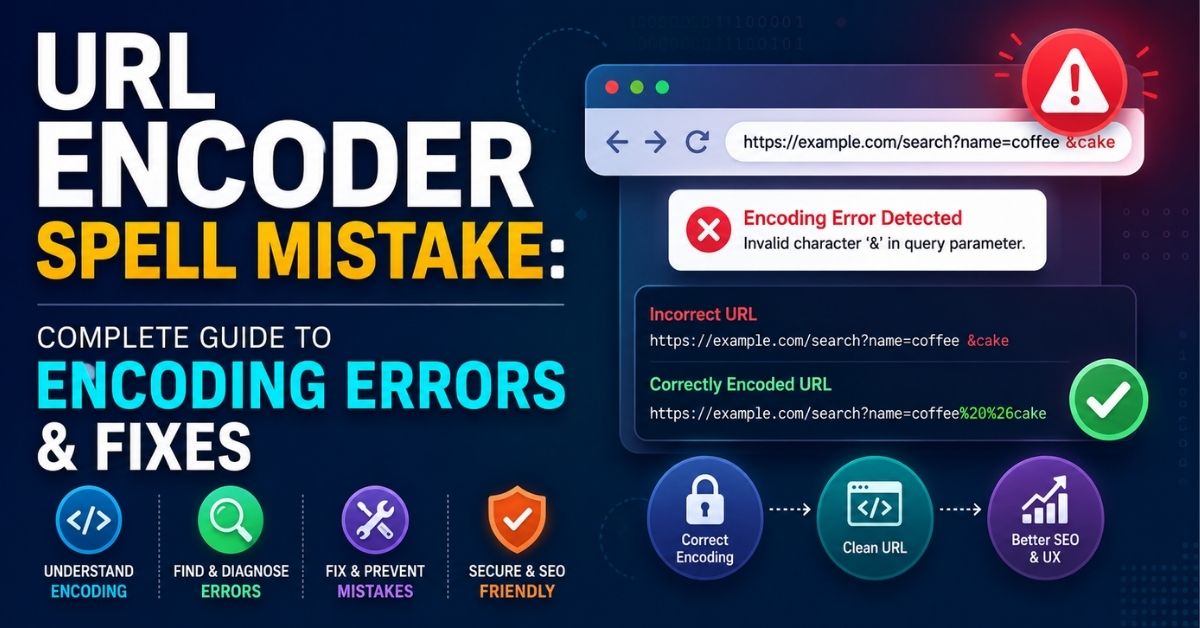
URL Encoder Spell Mistake: Complete Guide to Encoding Errors & Fixes
Every day, millions of people type a search term without knowing the exact name for what they need. One of those terms is url encoder spell mistake. Most people who search this phrase are not asking about spelling at all. They are dealing with a broken link, a failed form, or an error message they don’t understand. This guide explains what a url encoder spellmistake really means, why it happens, and how you can fix it for good.
You don’t need to be an expert programmer to follow this guide. We will walk through URL encoding, URL decoding, common mistakes, and simple fixes. We will also cover SEO, security, and real code examples in JavaScript, PHP, Python, Java, and C#. By the end, you’ll know exactly how to spot and solve any URL encoding error you come across.
What Is a URL Encoder Spell Mistake?
A url encoder spell mistake happens when a URL contains characters that are encoded the wrong way. This isn’t really a spelling problem. It’s an encoding problem. The URL might have a missing percent sign, an incomplete percent sequence, or a special character that was never converted at all.
Here’s a simple example. The words “Hello World” should become Hello%20World after proper URL encoding. But if something goes wrong, you might see Hello%2World instead. That’s an invalid URL encoding error. The browser or server won’t know what to do with it, and the request often fails. This is the core idea behind almost every URL encoding mistake you’ll read about in this guide.
How URL Encoding Works
URL encoding, also called percent encoding, turns risky characters into a safe format. Think of it like sending a fragile gift in the mail. You wrap it up first so nothing breaks along the way. That’s what an encoder does to a URL before it travels across the internet.
Every URL follows strict URL syntax rules. Some characters are called reserved characters because they have a special job, like /, ?, and &. Other characters are unreserved characters, like letters and numbers, and they don’t need any special treatment. When a reserved character or a symbol appears where it shouldn’t, the encoder converts it into a percent-encoded URL value instead.
How Characters Are Converted Into Percent-Encoding
The conversion process is simple once you see it. First, the encoder looks at the character. Then it finds the character’s ASCII or Unicode value. Next, it converts that value into hexadecimal digits. Finally, it adds a percent sign in front of those digits.
| Character | Encoded Value |
| Space | %20 |
| ! | %21 |
| # | %23 |
| & | %26 |
| / | %2F |
| ? | %3F |
| = | %3D |
This table shows some of the most common encoded characters you’ll see in a web URL encoding process. Without this step, URL parameters and query strings would break constantly.
URL Encoding vs. URL Decoding
URL encoding and URL decoding are opposite processes, but people mix them up all the time. Encoding happens before a request is sent. Decoding happens after the server receives it. One protects the URL structure. The other restores the original, human-readable text.
| URL Encoding | URL Decoding |
| Converts text into a safe format | Converts encoded text back to normal |
| Happens before sending data | Happens after receiving data |
| Uses a percent sign and hex digits | Reverses the percent sequence |
| Done by the URL encoder | Done by the URL decoder |
A common url decoder spellmistake happens when data gets decoded more than once, or decoded before it’s properly checked. This small mix-up causes a surprising number of bugs in real web applications.
Common URL Encoding Mistakes
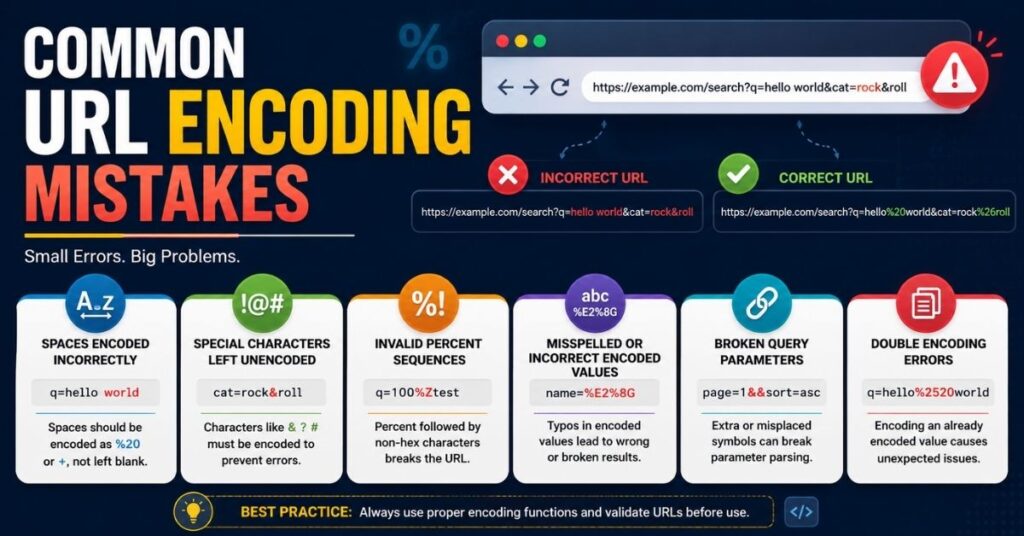
Most URL encoding errors repeat themselves across different websites and apps. Once you learn to spot them, they become much easier to fix. Below are the most frequent mistakes developers run into.
Each mistake looks small on its own. But even one wrong percent sequence can break a login page, a search bar, or an entire API request. Let’s go through them one at a time.
Incorrectly Encoded Spaces
A raw space inside a URL is never safe. It should always become %20, or sometimes a plus sign in a query string. For example, example.com/search?q=red shoes is broken. The correct version is example.com/search?q=red%20shoes. This one fix alone solves a huge share of search and form problems.
Unencoded Special Characters
Characters like &, ?, %, and = all carry special meaning inside a URL. If you leave them unencoded inside a value, the URL parser gets confused. It may think a new query parameter has started when it hasn’t. This is one of the most common causes of malformed URL parameters in the wild.
Invalid Percent-Encoding Sequences
Percent-encoding rules require exactly two hexadecimal digits after every percent sign. A value like %2 is incomplete and invalid. The correct version needs a second digit, such as %20. This kind of incorrect percent encoding often triggers a confusing error message in browser developer tools.
Misspelled or Incorrect Encoded Values
Sometimes a developer types the encoded value by hand and gets it wrong. A value like %2G is not valid because “G” isn’t a real hex digit. This is an invalid percent-encoded character, and it will break the URL every time. Manual typing is risky, and mistakes like this are surprisingly common.
Broken Query Parameters
Poorly built query string encoding causes strange application behavior. Compare ?name=John&city=New York with the correct version, ?name=John&city=New%20York. The first one splits into confusing pieces. The second one stays clean and readable to both the browser and the server.
What Causes URL Encoding Errors?
URL encoding errors rarely come from just one source. Usually, a few small problems stack up together until something finally breaks. Understanding the root causes makes URL encoding error troubleshooting much faster.
Most causes fall into three buckets: manual mistakes, conflicting systems, and mismatched character encoding. Let’s break each one down.
Read More: CNLaw Blog 2026: Complete Guide to Legal Content, Trust & Safety
Manual URL Construction Errors
Building a URL by hand, using simple string joining, is risky. A line like “https://example.com?q=” + searchTerm looks harmless. But if searchTerm contains a space or a &, the entire request can fail. This is called an improperly encoded URL, and it usually comes from skipping proper encode special characters functions.
Frontend and Backend Encoding Conflicts
Sometimes both the frontend URL encoding layer and the backend URL encoding layer try to encode the same text. When that happens, you get a double-encoded mess. The frontend encodes it once, and then the backend encodes it again by mistake. Clear rules about who owns encoding responsibility can prevent this problem entirely.
Character Set and UTF-8 Problems
Modern systems rely on UTF-8 encoding as the global standard. But if one part of your system uses a different character encoding, names and symbols can turn into garbage text. For example, “José” might display as “José” if the systems disagree. This kind of Unicode URL handling issue is especially common on internationalized URLs with accents or non-English scripts.
Double URL Encoding: What It Is and How to Fix It
Double URL encoding happens when text that’s already encoded gets encoded a second time. This creates strange, broken values that are hard to read and even harder to debug. It’s one of the trickiest URL encoding mistakes to catch without the right tools.
The good news is that once you know the pattern, double encoding becomes easy to spot. Let’s look at how it happens and how to reverse it.
How Double Encoding Happens
Imagine the phrase “hello world.” First encoding turns it into hello%20world. Then, if something encodes it again, it becomes hello%2520world. Notice how %20 turned into %2520. This usually happens when multiple libraries, middleware layers, or API request handlers all touch the same value without checking if it was encoded already.
Read More: Uploadblog.com: Complete Guide, Features, Content & Updates
Signs of Double-Encoded URLs
You can usually spot double-encoded parameters by watching for a few warning signs. An unexpected %25 appearing in a URL is the biggest clue. Broken redirect links, garbled query parameters, and strange API request failures are also common symptoms of this problem.
How to Correct Double Encoding
Fixing double encoding starts with decoding the value one time and checking the result. If the text still looks encoded, decode it again carefully, but only as needed. After that, validate the final result before you use it anywhere. Testing tools make this process much faster and more reliable than guessing by hand.
How to Diagnose a URL Encoding Error
Diagnosing a URL encoding error works best with a clear, repeatable method. Random guessing wastes time and often misses the real problem. A step-by-step approach gets you to the answer much faster.
Below are four practical steps that most developers use every day to track down broken URLs.
Inspect the URL in Browser Developer Tools
Browser developer tools let you see exactly what request was sent. Open the Network tab, click on the failing request, and compare the actual URL against what you expected. This single step solves many simple URL validation problems almost instantly.
Check Network Requests and Query Parameters
Look closely at each query parameter inside the request. Compare what the user typed against what the browser actually sent. If they don’t match, you likely have an encoding or decoding mismatch somewhere in the chain.
Review Server Logs
Server logs often reveal the exact failing request path, along with any error message the server produced. This is especially useful for API request failures that don’t show clear errors on the frontend side.
Validate Encoded and Decoded Values
Take the suspicious value and run it through a trusted URL decoder. Compare the decoded output against what the original input should have been. This quick check confirms whether the encoding was correct in the first place.
How to Fix a URL Encoder Spell Mistake Step by Step
Once you’ve found the problem, fixing it follows a clear path. Skipping steps often leads to the same bug coming back later. This process works for almost any URL encoding mistake, big or small.
Follow these five steps in order, and don’t rush past the testing stages.
Identify the Problem URL and Character
Find the exact URL that’s failing, and pinpoint the specific character or path segment causing trouble. Being precise here saves a lot of time later.
Validate the Correct Encoding
Check the correct percent-encoding rules for that character. Confirm it matches accepted URL encoding standards, such as those defined by official URI encoding specifications.
Decode and Re-Encode the URL
Use a trusted URL decoder to unwrap the value first. Then apply a trusted encoder to rebuild it correctly. Avoid editing the raw text by hand during this step.
Test the Corrected URL
Run the corrected URL through your application again. Confirm it behaves the way you expect, whether that’s loading a page, submitting a form, or completing an API request.
Verify the URL Across Browsers and Environments
Different browsers sometimes handle edge cases differently. Test your fix across Chrome, Firefox, and Safari, and also check it in staging and production environments before calling it done.
URL Encoding in APIs and Web Applications
API request handling depends heavily on correct URL encoding. A single unencoded character can cause an entire request to fail, even if the rest of your code is perfect. This makes URL encoding for APIs one of the most important skills for backend developers.
Web applications face similar risks, especially when user input flows directly into links, forms, or HTTP request headers. Let’s look at where these problems usually show up.
Common API Encoding Problems
Typical issues include invalid query parameters, broken authentication tokens, corrupted pagination links, and failed search requests. Many of these problems trace back to a missing or incorrect encoding step somewhere in the request pipeline.
Query Strings, Parameters, and Encoded Data
Consider this API request: /api/search?q=laptops & tablets. Without encoding, the server may treat the ampersand as a new parameter separator. The correct version, /api/search?q=laptops%20%26%20tablets, keeps the entire phrase intact and readable by the API.
Frontend vs. Backend Encoding Responsibilities
Clear ownership prevents most conflicts. The frontend usually handles user input and builds the initial URL. The backend handles validation, decoding, and safe storage. When both sides understand their job, double-encoded parameters become far less likely.
URL Encoding Examples and Real-World Errors
Real examples make these ideas easier to understand. Below are four common situations where a small URL encoding mistake causes a big problem for users.
These cases happen across nearly every industry, from retail websites to banking portals to internal company tools.
Search Query Failure
A user searches for “Best laptops & accessories.” Without proper encoding, the ampersand splits the search into two unrelated pieces, and the results come back wrong or empty.
Read More: Izonemedia360 com: Free Online Promotion Tools In 2026
Login and Redirect Problems
Passwords containing special characters can fail validation if they aren’t transmitted correctly. Similarly, a redirect link with unencoded parameters can send a visitor to the wrong page entirely.
File Download Errors
File names that include spaces or symbols often produce broken download links. This is a classic case of URL characters needing proper encoding before they’re placed inside a link.
API Request Failures
Many so-called application bugs are really just malformed URL issues hiding inside an API request. Fixing the query string encoding often solves the entire problem instantly.
Does URL Encoding Affect SEO?
Yes, URL encoding absolutely affects SEO, and the impact is often invisible until rankings quietly drop. Search engines depend on clean, readable URLs to properly crawl and understand a website.
Encoding problems create confusion for both the crawler and the visitor at the same time. Below are the main areas where this damage shows up.
URL Encoding and Crawling
A crawler can struggle to access malformed URLs, especially when special characters in URLs aren’t handled correctly. This can quietly reduce how much of your site gets discovered.
URL Encoding and Duplicate URLs
Improper encoding sometimes creates multiple versions of the same page. For example, /page-name and /page%2Dname might be treated as two separate pages, even though they lead to identical content. This is a classic duplicate URL problem.
URL Encoding and Indexing
Broken URLs often fail to enter search engine indexing at all. If a page can’t be reached cleanly, it simply won’t show up in search results, no matter how good the content is.
International URLs and Unicode Characters
Internationalized URLs carry extra risk. Incorrect Unicode URL handling can corrupt non-English URLs, which directly hurts visibility in international search markets.
URL Encoding Security Risks
URL encoding security risks are real, and they go beyond simple technical annoyances. Improper handling of URL characters can open the door to serious vulnerabilities.
“Many web application vulnerabilities begin with improper handling of user input.”
This idea sits at the heart of good input validation practices across the entire tech industry.
Improper Encoding and Input Validation
Poor encoding combined with weak input validation can lead to injection attacks, parameter tampering, open redirects, and even data leakage. These risks grow quickly when user input reaches a URL without proper checks.
Why Trusted Encoding Functions Matter
Using a trusted encoder function is one of the simplest ways to reduce security risk. Built-in tools already follow accepted URL encoding standards, so they handle edge cases far better than manual code ever could.
Best Practices to Prevent URL Encoding Errors
Preventing URL encoding errors is far easier than fixing them after launch. A handful of simple habits can eliminate most problems before they ever reach real users.
These practices apply equally to small websites and large-scale web applications handling millions of requests.
Standardize UTF-8 Character Encoding
Keep UTF-8 encoding consistent across your entire stack, from the database to the frontend. Mixed character encoding systems are one of the biggest hidden causes of broken text and symbols.
Validate User Input and URL Parameters
Always check user input before it becomes part of a URL. Good input validation catches dangerous or malformed values early, long before they cause a visible bug.
Test Edge Cases Automatically
Build automated tests around emojis, accented letters, long strings, and unusual symbols. These edge cases reveal weaknesses that normal testing often misses completely.
Document Encoding Rules Across Systems
Write down your URL encoding standards so every team follows the same rules. Shared documentation prevents the classic conflict between frontend URL encoding and backend URL encoding teams.
URL Encoding Tools for Testing and Validation
The right tools make URL encoding error troubleshooting dramatically faster. Instead of guessing, you can confirm exactly what’s wrong within seconds.
Below are the main categories of tools most developers rely on daily.
Online URL Encoder and Decoder Tools
Simple browser-based URL encoder and URL decoder tools let you paste text and instantly see the encoded or decoded version. These are perfect for quick, one-off checks.
URL Validators and Debugging Tools
Browser developer tools, along with dedicated URL parser and validation tools, help confirm whether a URL follows correct URL syntax. Many API testing platforms also include built-in URL validation features.
When to Use an Online Tool vs. Code
Use an online tool for a fast manual check. Use code, with a trusted encoder library, for anything that runs automatically in production. Relying only on manual tools at scale invites human error back into the process.
URL Encoding Checklist for Developers
A simple checklist keeps URL encoding consistent across every stage of a project. Below are three tables covering development, testing, and long-term maintenance.
| Development Checklist | Status |
| URL-safe encoder functions used | ✔ |
| UTF-8 encoding enabled everywhere | ✔ |
| Input validation configured | ✔ |
| Testing Checklis | Status |
| Special characters tested | ✔ |
| International text verified | ✔ |
| API request flows validated | ✔ |
| Production and Maintenance Checklist | Status |
| Redirect links checked | ✔ |
| Canonical URL tags reviewed | ✔ |
| Server logs monitored regularly | ✔ |
Frequently Asked Questions
What is a URL encoder spell mistake?
It’s a common search phrase for URL encoding errors, including invalid URL encoding, missing percent signs, or malformed URL parameters.
How do I fix invalid URL encoding?
Identify the broken character, apply correct percent-encoding rules, and test the result using a trusted URL encoder or URL decoder.
What causes double URL encoding?
Double URL encoding happens when data passes through more than one encoding step without proper checks in between.
Does URL encoding affect SEO?
Yes. Incorrect encoding can cause crawling problems, duplicate URL issues, and poor indexing, all of which hurt SEO performance.
What is %27 in URL encoding?
%27 represents an apostrophe, or single quote character, once it’s been through percent encoding.
How do I fix an invalid URL?
Check for missing percent signs, incomplete percent sequences, and unencoded special characters, then rebuild the URL using a trusted encoder.
How is the question mark (?) encoded in URLs?
A literal question mark inside a value is encoded as %3F. Outside of a value, it usually marks the start of the query string.
How to encode a hyphen in a URL?
A hyphen is an unreserved character, so it generally doesn’t need encoding at all inside standard URL syntax.
Conclusion
A url encoder spell mistake almost always comes down to one thing: incorrect URL encoding somewhere in the chain. Whether it’s a missing percent sign, a double-encoded parameter, or a UTF-8 encoding mismatch, the root cause is usually simple once you know where to look.
The fix is just as simple. Use trusted encoder and decoder functions, keep character encoding consistent, validate every URL parameter, and test your edge cases before launch. Follow these habits, and URL encoding errors will become a rare inconvenience instead of a constant headache.

Ryan Mitchell is a writer and language enthusiast at MeaningZen. He creates simple guides on slang, word meanings, grammar, and modern internet language. His goal is to make confusing words and phrases easy to understand.